Teach Me
How to Start a Teach Me Session
Written By:
Overview
Teach Me allows users to follow step-by-step interactive training sessions generated from recorded workflows. It helps new team members learn processes directly within the application.
Prerequisites
A recorded workflow is available in your workspace.
Teach Me access permissions are granted.
Steps
Step 1: Click on the DocuFast Extension
Open your browser and find the DocuFast extension icon. Click on it to open the tool.

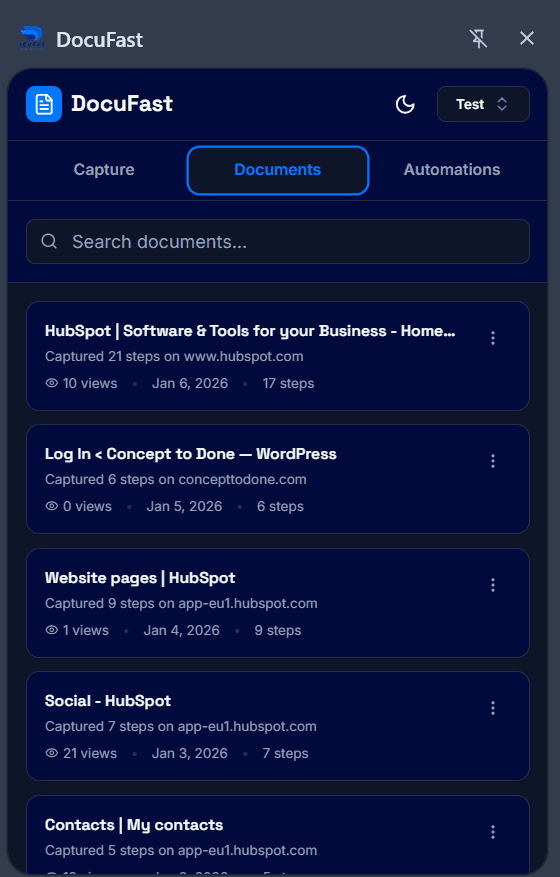
Step 2: Go to the Documents Tab
Navigate to the Documents tab. This will show all your available documents that you can work with.
Step 3: Choose Your Document
Browse through the list and select the document you want to work with. If you have multiple documents, make sure to pick the one that aligns with what you need to learn.
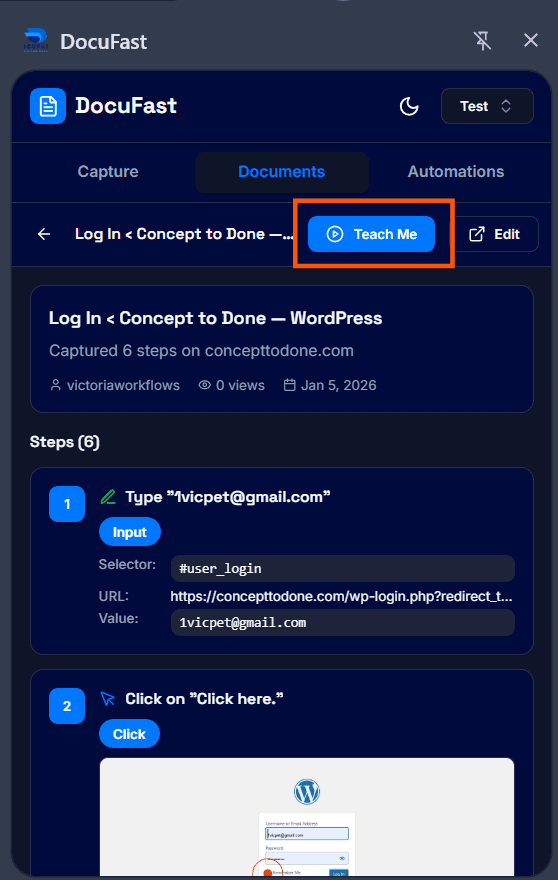
Step 4: Click Teach Me
After selecting the document, you'll see the option to click on "Teach Me". This button will activate the interactive guide mode.
Step 5: Follow the Interactive Guide
Once you’ve clicked "Teach Me," an interactive guide will appear. Follow the on-screen instructions step-by-step to ensure you’re getting the most out of the Teach Me feature.
Tips for Best Results
Use Teach Me to onboard new employees efficiently.
Ensure your browser allows overlay permissions for the guide prompts.
Revisit completed sessions anytime for review.
Related to Teach Me
