Collaborating
Assigning Roles and Permissions
Written By:
Overview
Roles and permissions in DocuFast define what each team member can do within the workspace. Assigning the right roles helps prevent accidental changes, keeps guides organized, and allows teammates to focus on tasks relevant to their responsibilities. By carefully managing access, teams can collaborate efficiently while maintaining control over sensitive or critical documents.
Why Assigning Roles and Permissions Is Important
Protect Guides from Accidental Changes: Limiting edit or delete access ensures critical guides are not altered unintentionally.
Enable Effective Collaboration: Team members get access appropriate to their role—viewers can read, editors can update, and admins can manage broader settings.
Maintain Accountability: Clear roles make it easy to know who made changes or updates.
Support Workspace Management: Roles like Admin allow teams to manage members, permissions, and workspace settings efficiently.
Understanding DocuFast Roles
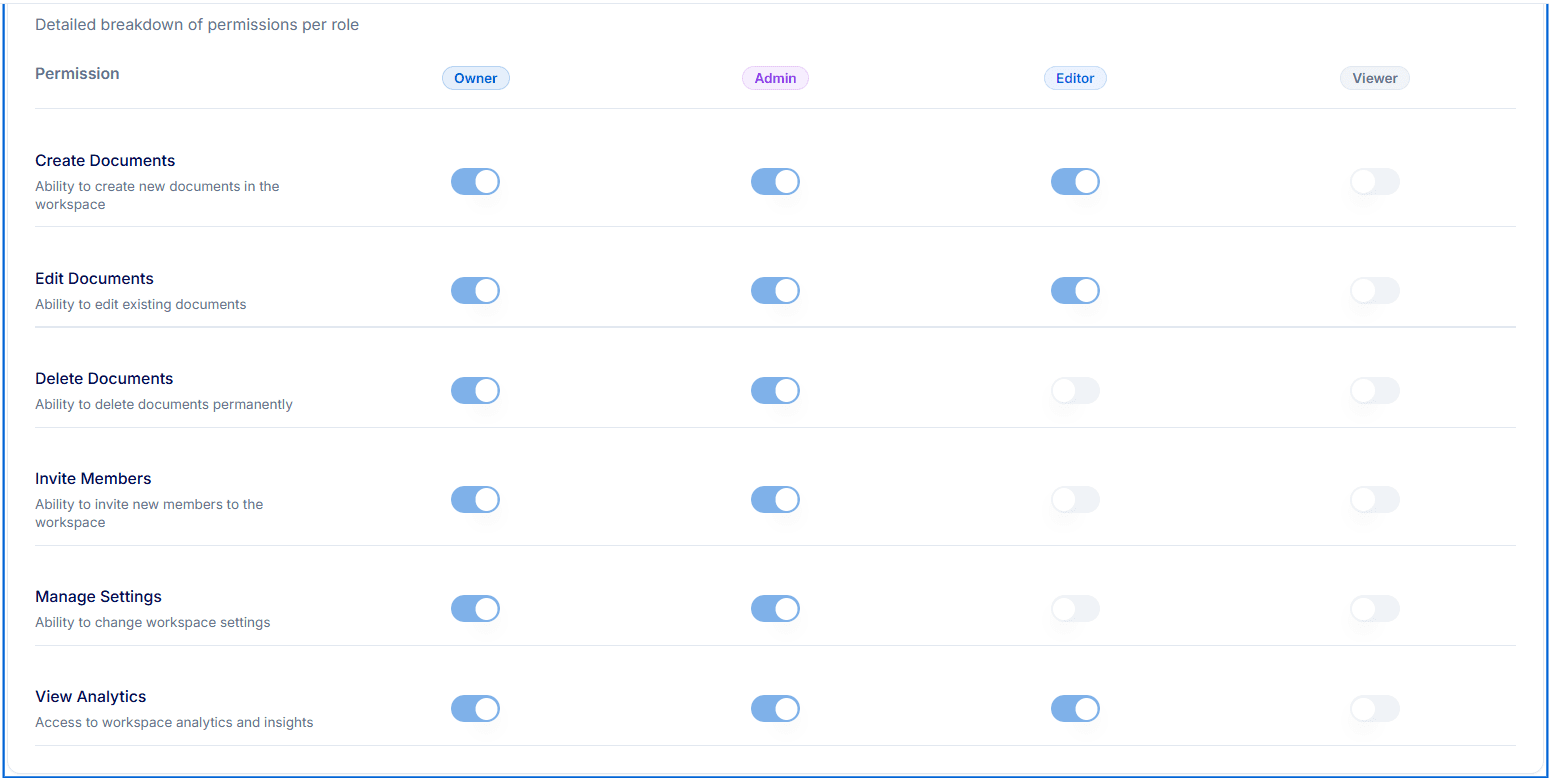
DocuFast provides four main roles for team members:
Owner
Full access to all workspace features and settings
Can create, edit, and delete documents
Can invite members and manage settings
Can view workspace analytics
Admin
Manage members, settings, and workspace settings
Can create, edit, and delete documents
Can view analytics
Ideal for team leads
Editor
Can create and edit documents
Can view analytics
Cannot delete documents or manage workspace settings
Best for teammates actively contributing content
Viewer
Read-only access to guides
Cannot create, edit, delete, or manage settings
Suitable for stakeholders or team members who only need reference access
Matching Roles to Responsibilities
When assigning roles, consider the responsibilities of each team member:
Editors: Teammates responsible for creating new guides or updating existing ones
Admins: Team leads who need broader control over workspace organization, analytics, and member management
Viewers: Teammates or stakeholders who only need to access guides without making changes
Owners: Typically the workspace creator or lead who oversees all documents and settings
