Best Practices for Team Collaboration
Written By:
Last Updated on May 21, 2026
Overview
Team collaboration in DocuFast is more than sharing a guide—it’s about assigning ownership, coordinating edits, providing feedback, and maintaining consistency. Here are the best practices that ensure that every guide stays up-to-date, accessible, and reliable for the entire team.
1. Assign Guide Ownership
Every guide/folder should have a responsible team member assigned to it, who ensures it’s kept up-to-date and reviewed regularly.
This person is responsible for maintaining the guide, coordinating updates, and reviewing feedback.
2. Set Roles and Permissions
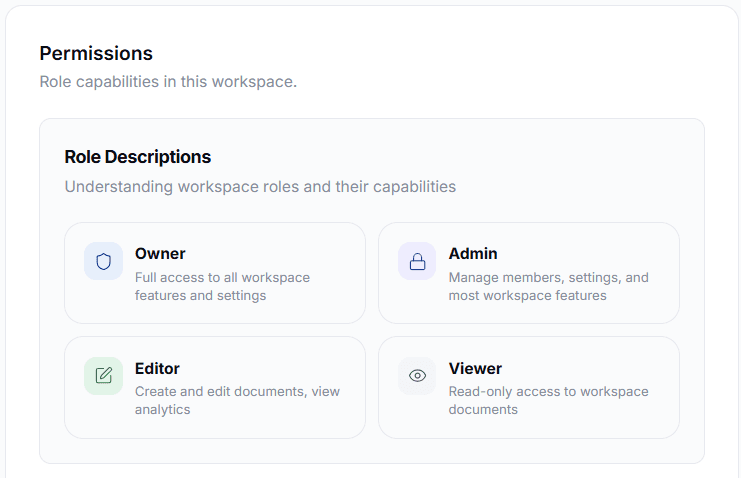
Control who can edit, comment, or view guides at the workspace level.
Editor Access: Give to teammates who are creating new content, updating existing guides, or viewing analytics.
Admin Access: Give to teammates who need full control, including creating and updating guides, deleting outdated guides, viewing analytics, and inviting new members for collaboration.
Viewer Access: Use for teammates providing feedback without making edits.
3. Coordinate Guide Creation and Edits
Schedule regular check-ins or quick messages within your team to coordinate guide creation and updates.
Before starting, plan who works on what.
When a teammate finishes creating, reviewing, or updating a guide, they should confirm completion.
4. Standardize with Templates
Use team-approved templates for consistency in formatting and structure.
Templates help new guides follow the same standard, saving time and reducing errors.
5. Collaborate Across Teams
When sharing a guide with another team or department, include a short note explaining its purpose and any actions required.
Tips:
Schedule regular collaboration check-ins for guides that are actively edited.
Avoid simultaneous editing of the same guide to prevent confusion and ensure updates are coordinated.
